Complete Guide to Image Formats: Which Format to Use When
Learn when to use JPG, PNG, WebP, AVIF, GIF, and more. Complete comparison with pros, cons, and best practices for each format explained.
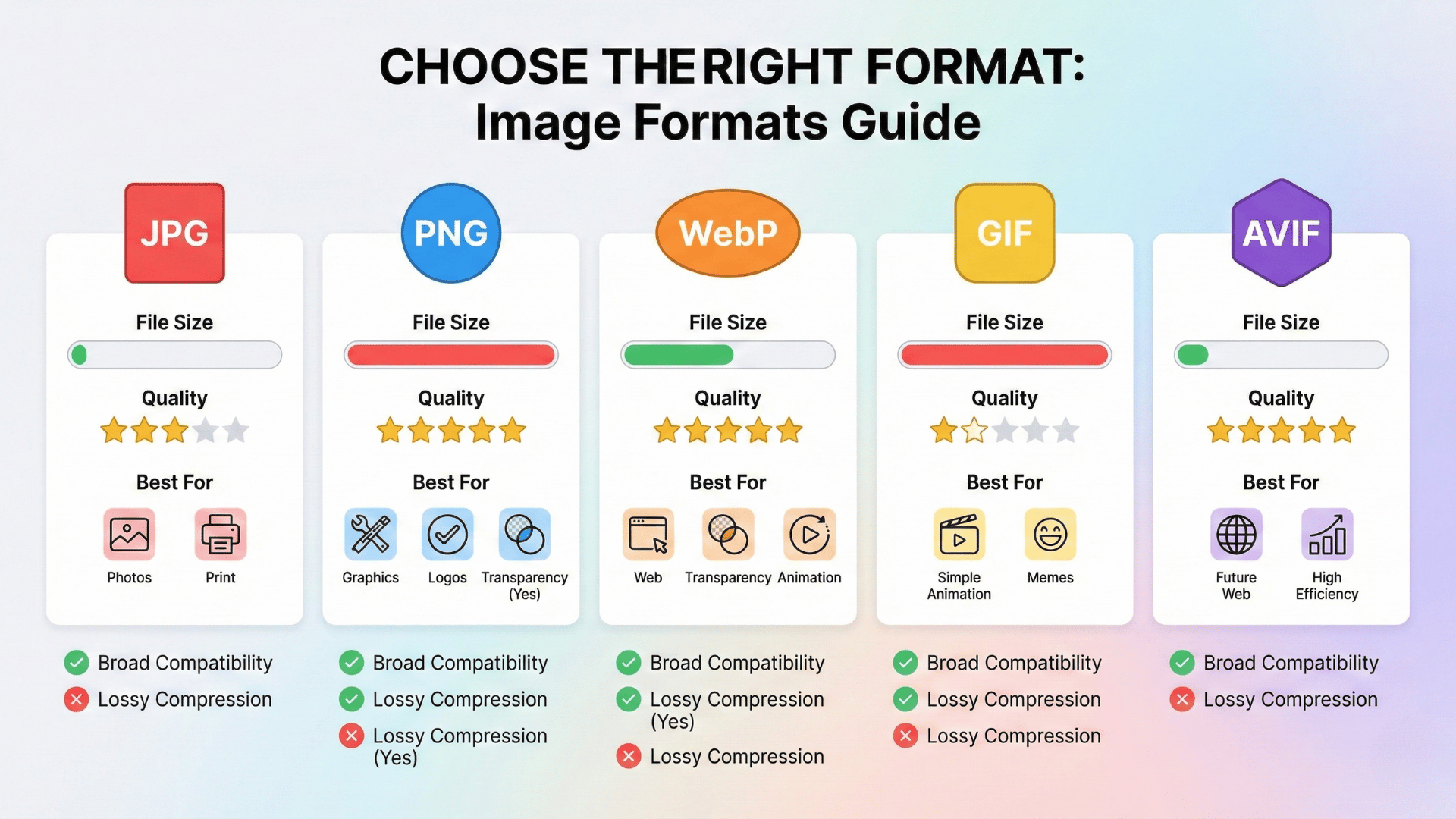
Confused About Which Image Format to Use?
You're saving an image. The software asks: "Save as JPG? PNG? WebP? Maybe GIF?"
You panic-click JPG because... that's what everyone uses, right?
Wrong move. Using the wrong format means either terrible quality (pixelated logos in JPG) or massive file sizes (photos saved as PNG).
Every image format exists for a reason. Let's break down exactly when to use each one—no technical jargon, just practical answers.
The Main Image Formats You Need to Know
📷 JPEG / JPG - The Photo Format
What it is: Lossy compression designed for photos
Best for:
- Photographs
- Images with lots of colors and gradients
- Social media posts
- Product photos
- Background images
Pros:
- Small file sizes (great for web)
- Works everywhere (universal support)
- Handles millions of colors
- Adjustable quality/compression
Cons:
- No transparency support
- Quality degrades with each re-save
- Bad for text, logos, sharp edges
- Can show compression artifacts
File size
Small to medium
When to use
90% of photos
When NOT to use
Logos, graphics with text, transparency
🎨 PNG - The Graphics Format
What it is: Lossless compression with transparency support
Best for:
- Logos and icons
- Graphics with text
- Images requiring transparency
- Screenshots
- Infographics
- Whenever quality matters more than file size
Pros:
- Supports transparency
- Lossless (perfect quality)
- Great for sharp edges and text
- No quality loss when re-saving
Cons:
- Large file sizes (2-5x bigger than JPG)
- Overkill for photos
- Slower loading on websites
File size
Medium to large
When to use
Logos, graphics
When NOT to use
Photos (use JPG instead)
🌐 WebP - The Modern Web Format
What it is: Google's format with superior compression + transparency
Best for:
- Website images (any type)
- E-commerce product photos
- Modern web apps
- Anywhere file size matters
Pros:
- 25-35% smaller than JPG/PNG
- Supports both lossy and lossless
- Supports transparency
- Works in all modern browsers
Cons:
- Limited support in older browsers
- Not widely supported outside web
- Fewer editing tools support it
File size
Small (best)
When to use
Modern websites
When NOT to use
Old browsers, offline use
🆕 AVIF - The Next-Gen Format
What it is: The newest format with cutting-edge compression
Best for:
- Future-proofing websites
- Maximum file size reduction
- High-quality images at tiny sizes
Pros:
- 50% smaller than JPG
- Better quality at same file size
- Supports transparency
- HDR support
Cons:
- Still limited browser support
- Slower encoding/decoding
- Not all tools support it yet
File size
Smallest
When to use
Cutting-edge
When NOT to use
Not ready for mainstream yet
🎬 GIF - The Animation Format
What it is: Simple animation format with limited colors
Best for:
- Simple animations
- Memes
- Icons with basic animation
Pros:
- Supports animation
- Universal support
- Simple transparency
Cons:
- Limited to 256 colors
- Large file sizes for animations
- Better alternatives exist (MP4, WebP)
Quick Decision Guide: Which Format Should I Use?
For Photos:
- Web: WebP (with JPG fallback) or JPG
- Print: TIFF or high-quality JPG
- Social media: JPG
- Archive: TIFF or PNG
For Logos & Graphics:
- Web: PNG or SVG
- Print: SVG, PDF, or high-res PNG
- Transparent backgrounds: PNG or WebP
For Websites:
- First choice: WebP
- Fallback: JPG (photos) or PNG (graphics)
- Future-proofing: AVIF (with WebP/JPG fallbacks)
For Animations:
- Simple: GIF
- Complex: MP4 or WebM video
- Modern web: Animated WebP
Format Comparison Table
| Format | Best Use | Transparency | File Size | Quality |
|---|---|---|---|---|
| JPG | Photos, web | No | Small | Lossy |
| PNG | Logos, graphics | Yes | Large | Lossless |
| WebP | Modern web | Yes | Smallest | Both |
| AVIF | Next-gen web | Yes | Tiny | Excellent |
| GIF | Simple animations | Basic | Medium | Limited colors |
Common Format Mistakes to Avoid
Mistake #1: Saving logos as JPG
JPG compression destroys sharp edges. Use PNG instead.
Mistake #2: Saving photos as PNG
Unnecessarily large files. Use JPG or WebP for photos.
Mistake #3: Not using WebP for websites
WebP is 25-35% smaller. Faster sites = better SEO.
Mistake #4: Re-saving JPGs multiple times
Each save degrades quality. Edit in PNG, export final as JPG.
Mistake #5: Using GIF for photos
GIF is limited to 256 colors. Photos look terrible. Use JPG.
The Bottom Line
For most people:
- Photos: JPG (or WebP for web)
- Logos/Graphics: PNG
- Websites: WebP with JPG fallback
- Print: TIFF or high-quality JPG
Stop overthinking it. Those four formats cover 95% of real-world needs. The "best" format depends on what you're doing with the image. Now you know exactly which to choose.
Need to Convert Between Formats?
Our free image converter handles all 13+ formats—convert JPG to PNG, HEIC to JPG, WebP to PNG, and more.
Browser-based conversion. Your images never leave your device.
Related Tools
Image Converter
Convert between all formats
Image Compressor
Reduce file size in any format
Background Remover
Remove backgrounds from any format
Image Upscaler
Enhance resolution before converting
All free. All privacy-focused. Built for real people.